If you search for business process automation examples in Nigeria, you'll find plenty of articles explaining what automation could do.
But what does it actually look like when a Nigerian business has a real process that needs fixing?
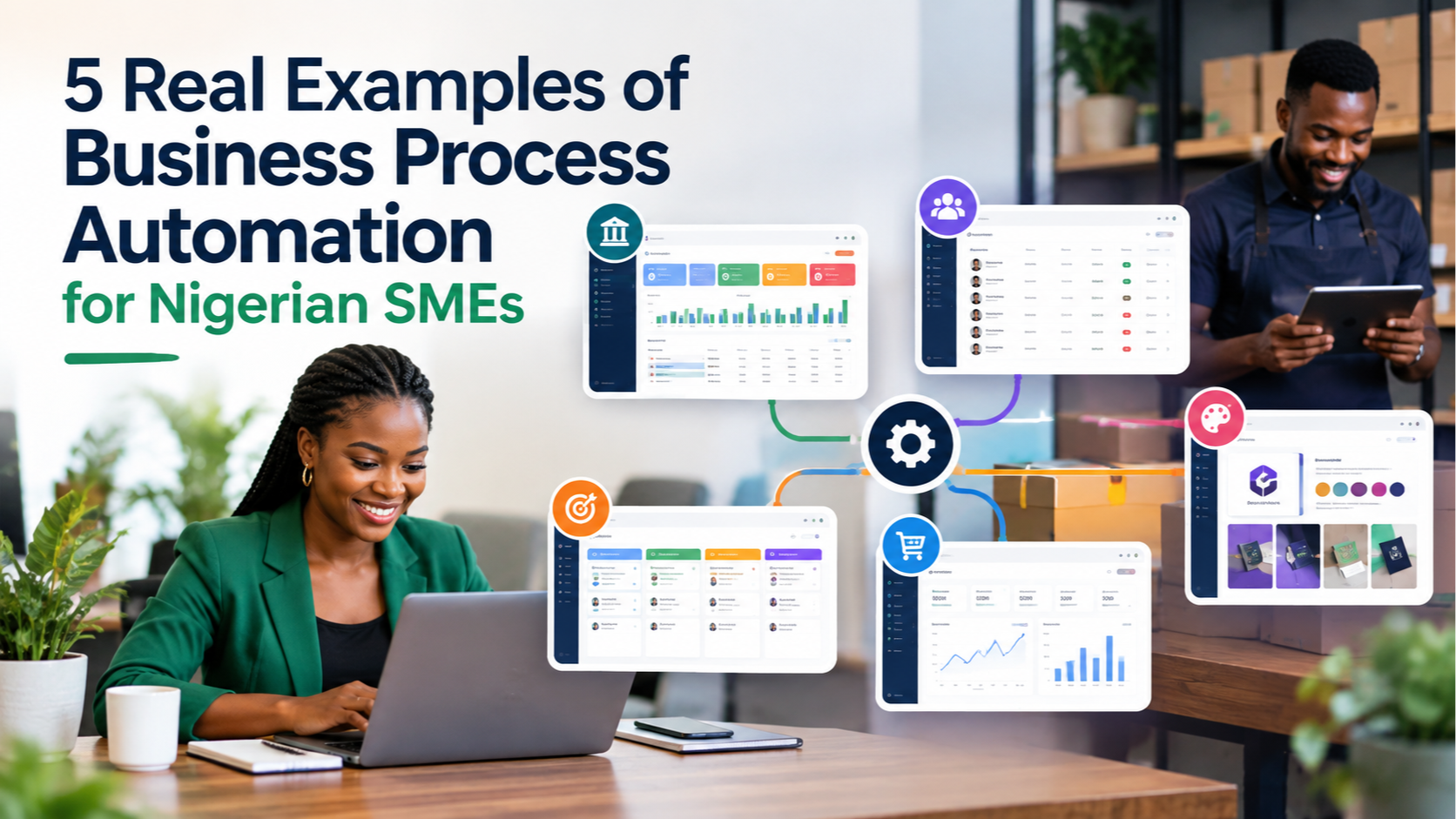
At Marex Ventures, we've built systems for tax and revenue administration, online sellers, client management, attendance and stipend tracking, and business branding. These aren't hypothetical examples. They're systems designed around real processes and real business needs.
Here are five examples of what business process automation can look like in practice.
What is business process automation?
Business process automation means using software, connected systems, or defined logic to handle repeatable business tasks with less manual work.
That doesn't always mean replacing people.
It can simply mean removing the repetitive steps people shouldn't have to keep doing manually.
For example:
- entering the same information into multiple places
- calculating payments from attendance records
- tracking leads across spreadsheets
- preparing proposals from meeting notes
- checking which invoices have been paid
- turning sales records into useful reports
- generating documents from information already in a system
The goal is simple: let the system handle the repeatable parts so people can focus on the work that requires judgement.
Here are five real examples from Marex Ventures.
1. TaxFlow Revenue Manager: Managing a Large Taxpayer Workflow
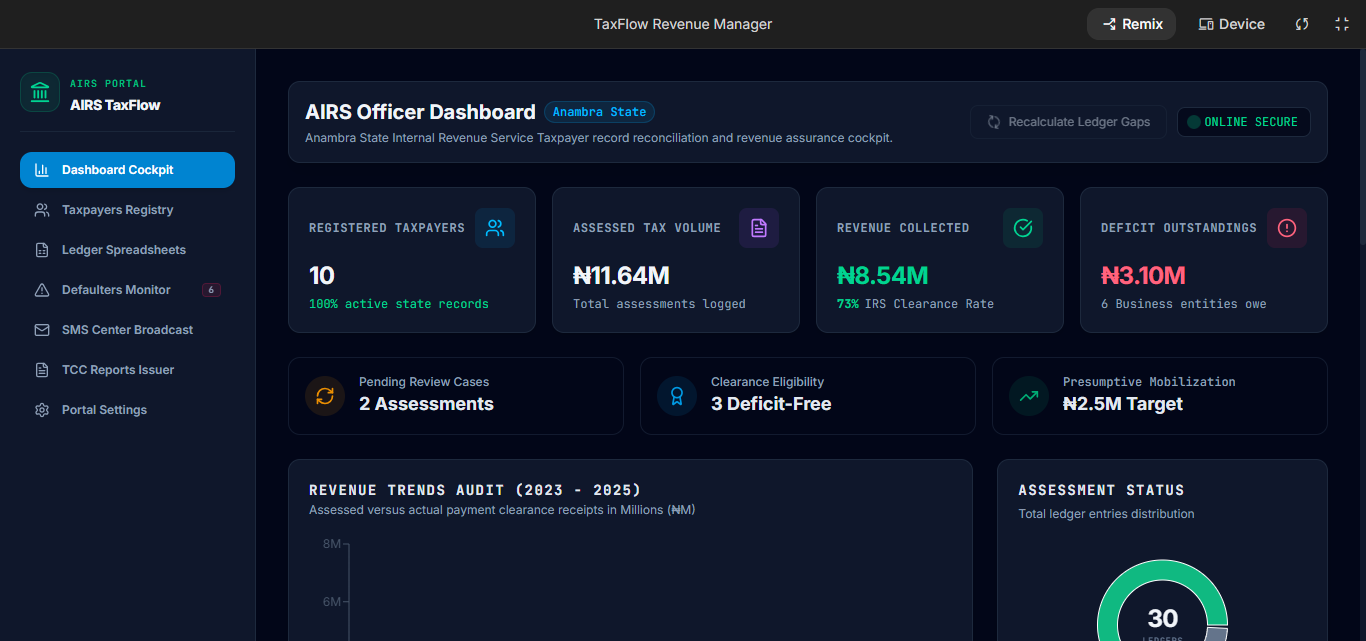
One of the clearest examples is a revenue management system built to handle taxpayer records and revenue administration.
The problem was familiar.
A large amount of taxpayer information was being managed through spreadsheets and manual processes. As the number of records grows, simply finding information, tracking liabilities, checking payment status and preparing reports becomes harder.
The solution was a centralised revenue management system.
What the system does
The dashboard gives an overview of important information, including:
- registered taxpayers
- assessed taxpayers
- revenue collected
- outstanding deficits
- office or location information
The taxpayer registry allows users to search records and see information such as:
- taxpayer name
- phone number
- address
- business segment
- ledger balance
- tax clearance status
The system also includes a ledger for tracking assessments and payments across different years.
There is a bulk import function for bringing existing records into the system instead of entering them one by one.
Where the automation happens
The value isn't just having a dashboard.
The system connects several activities that would otherwise require separate manual steps.
For example, taxpayer information can be used to monitor outstanding liabilities, identify taxpayers who need follow-up, and send relevant SMS notifications.
The SMS centre includes templates for different compliance situations, such as outstanding payments, tax clearance reminders and filing notices.
There is also a tax clearance certificate function that uses the taxpayer's compliance information to generate the relevant certificate.
Instead of having information sitting in one spreadsheet and the next step happening somewhere else, the system brings the workflow together.
Why this matters
For a business or revenue office managing a large number of records, the problem isn't simply "too much data."
It's what happens when people have to repeatedly search, calculate, copy and check that data manually.
A system like this creates one place to manage the workflow and makes the next action easier to identify.
2. Attendance & Stipend Tracker: Turning Attendance Into Payment
This is one of the clearest examples of how a relatively simple process can benefit from automation.
A real estate company had a programme involving more than 70 marketers who were being trained for three months.
Attendance was being recorded in Excel.
At the end of each period, someone still had to work out how much each person should receive based on their attendance.
A developer had quoted about ₦1.7 million to build an attendance and tracking system.
Instead, Marex built a practical attendance and stipend tracker around the actual process.
How it works
The existing attendance data can be uploaded into the system.
The system then applies the payment rules.
For example, if there are eight training sessions in a month:
- someone who attends all eight receives the full stipend
- someone who attends seven receives the corresponding amount
- someone who attends six receives the corresponding amount
- someone who attends five receives the corresponding amount
- someone who falls below the minimum attendance threshold becomes ineligible for payment
The important part is that the calculation follows the agreed rules instead of requiring someone to calculate every participant manually.
Why this is business process automation
The system takes:
Attendance data → payment rules → stipend eligibility → payment amount
That is a repeatable business process.
Once the rules are defined, the system can apply them consistently.
It reduces manual calculation, makes errors less likely and saves the organisation from paying for a much larger custom development project simply to solve one operational problem.
The result wasn't about adding more software.
It was about building the right system around the process that already existed.
3. Marex Business Operating System: From Lead to Project Delivery
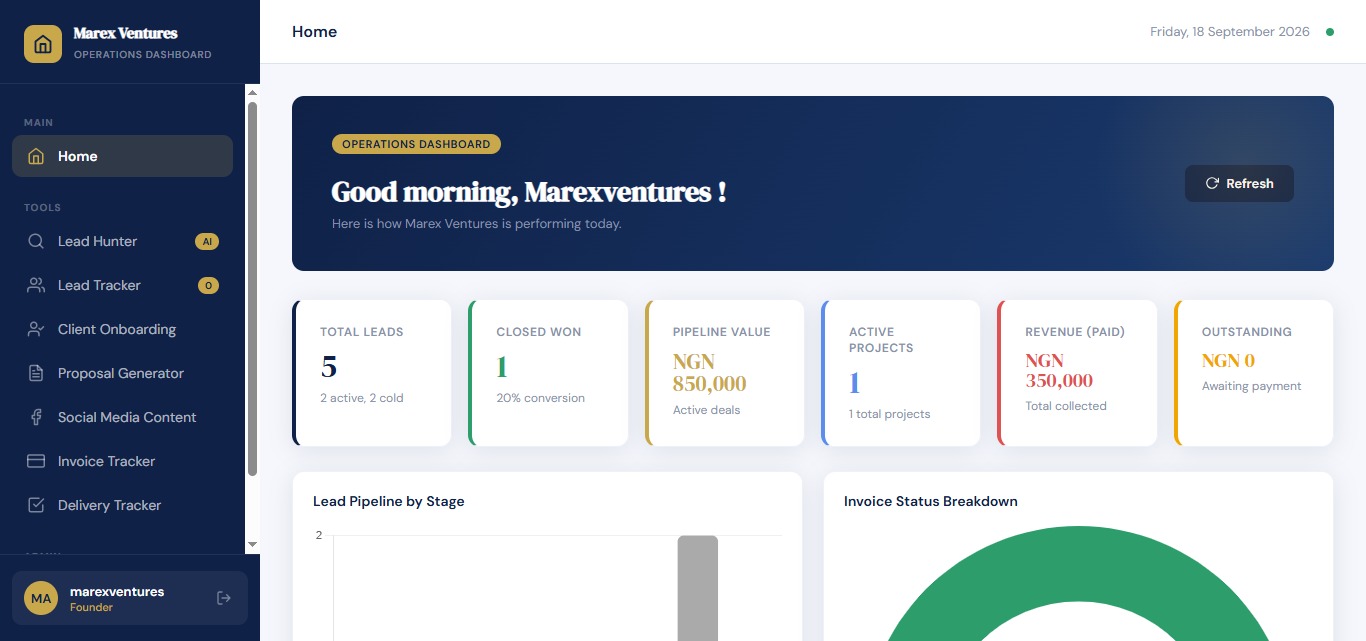
A growing service business can quickly end up with information spread across lead lists, messages, meeting notes, proposals, invoices and project trackers.
Marex Ventures needed to solve that problem internally.
So we built a Marex Business Operating System to manage the company's own workflow.
The system starts before a lead becomes a client and continues through project delivery.
Step 1: Find and track leads
The Lead Hunter allows us to define criteria such as:
- industry or business type
- target region
- business size
- specific search terms
- number of prospects
It then helps find prospects that fit those criteria and can generate a targeted LinkedIn search.
A suitable prospect can then be moved into the Lead Tracker.
The Lead Tracker holds information such as:
- business or lead name
- phone number
- lead source
- business type
- pain point
- service of interest
- current stage
- deal value
- last action
- notes
This means the lead doesn't have to be entered again from scratch when moving to the next stage.
Step 2: Move from lead to onboarding
Once a meeting is booked, the lead can move into client onboarding.
Existing information can carry forward, while additional client information is collected.
The system can also use the client's stated challenges to generate questions that help guide the meeting.
Step 3: Turn meeting notes into a project brief
After the meeting, the discussion can be added to the post-meeting brief.
The system then generates a structured project brief from those meeting notes.
That brief becomes the basis for the next stage.
Step 4: Generate the proposal
The project brief can move into the proposal generator.
The system produces a structured proposal containing details such as:
- client
- date
- investment
- timeline
- project requirements
From there, an invoice can be created.
Step 5: Track payment and delivery
Once an invoice is created, the client moves into invoice tracking.
Payment plans can be monitored, including milestone-based payments.
If an independent marketer brought in the client, commission can also be recorded as part of the tracking process.
Once the payment required to begin the project is received, the workflow moves into delivery.
The delivery tracker then follows project milestones.
When a milestone is completed, the next stage and relevant invoice can be tracked.
Client feedback and approval are also recorded during the project.
The bigger lesson
This is what happens when business process automation is designed around the whole journey, rather than one isolated task.
The workflow becomes:
Lead → Lead Tracking → Onboarding → Meeting → Project Brief → Proposal → Invoice → Delivery → Feedback
Each stage has somewhere to go next.
That reduces the amount of information that gets lost between stages and gives the business a clearer view of what is happening.
4. Marex Sellers: Helping Online Sellers Track the Money
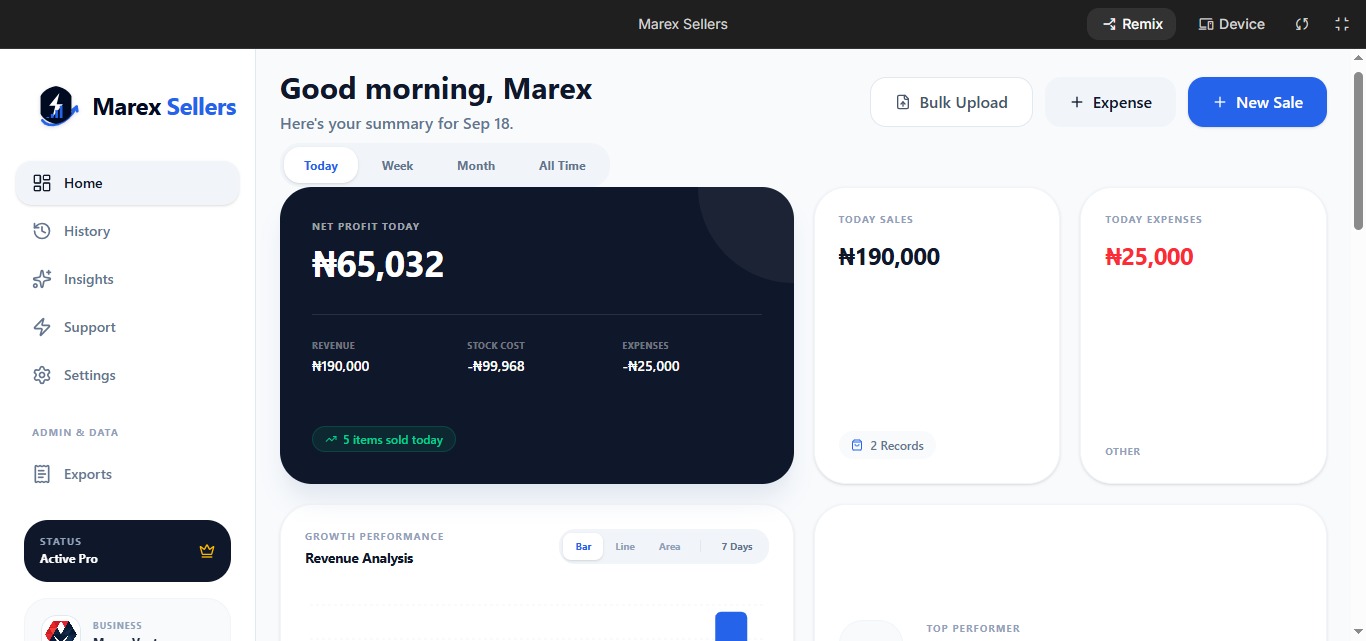
Many online sellers start by selling through WhatsApp, Instagram or other social platforms.
At the beginning, a simple notebook or spreadsheet may seem enough.
Then the number of orders increases.
Now there are sales to record, expenses to track, products to monitor and profit to calculate.
This is the problem Marex Sellers was built around.
What the system tracks
The dashboard gives sellers visibility into:
- sales
- revenue
- expenses
- profit
- stock
- recent transactions
- top-performing products
- sales trends
Sellers can view their performance by day, week, month or across all recorded sales.
There is also a sales history and export function.
The receipt problem
One particularly practical workflow is receipt capture.
A customer can send a receipt through WhatsApp.
Instead of the seller manually reading the receipt and entering all the information into the system, the receipt can be uploaded to the receipt scanner.
The system extracts the relevant information and captures it for the seller.
That turns:
Receipt → information extraction → sales record
into a much simpler workflow.
Business intelligence
Marex Sellers also includes an insight feature that analyses sales information and provides business recommendations, including estimated future revenue.
That gives the seller something more useful than a list of transactions.
It helps answer questions such as:
What is actually selling?
How is the business performing?
What could the numbers look like based on current performance?
For a small online seller, better records can lead to better decisions.
5. AI Brand Identity System: Turning a Branding Process Into a Guided System
Not every business process automation project looks like invoices moving between departments.
Some processes involve structured creative work.
For example, many small businesses need a proper brand identity but cannot afford to hire a full branding agency.
The AI Brand Identity System was designed to turn that process into a guided system.
How it works
The business owner provides information such as:
- company logo
- business description
- brand adjectives
- slogan or tagline
- typography preferences
- existing brand visuals
- mission
- vision
If some information is missing, the system can help fill the gaps.
The user then generates the brand identity.
The system can produce elements such as:
- brand interpretation
- brand tone and language
- business branding assets
- letterhead
- ID card concepts
- merchandise concepts
- office visual direction
It also explains how the logo connects to the company's identity and growth.
Why this belongs in the conversation
This isn't the same kind of automation as calculating stipends or tracking invoices.
But it shows another useful principle:
A repeatable business process can be turned into a structured system even when the process involves creative decisions.
Instead of starting from a blank page every time, the system guides the user through the information required and produces a structured result.
The point isn't to remove human judgement.
It's to reduce the amount of repetitive work involved in getting to the point where judgement matters.
What These Five Examples Have in Common
The five systems are very different.
One manages taxpayer information.
Another calculates stipends.
Another manages the entire journey from lead to project delivery.
Another helps online sellers understand their sales.
And another structures the branding process for small businesses.
But they all follow the same basic principle.
Start with the process, not the technology.
A good automation project doesn't begin with:
"Which AI tool should I use?"
It begins with:
"What happens in this process today?"
Then you identify:
- where information enters
- who handles it
- where it moves
- where someone repeats the same task
- where information gets lost
- where calculations are done manually
- where a decision depends on information that already exists somewhere else
- what should happen next
Only then does it make sense to decide whether the solution should be an automation, an internal tool, a custom dashboard, an AI-assisted workflow or some combination.
This is why a workflow audit matters.
Before building, you need to understand how the business actually operates.
When Should a Nigerian SME Consider Business Process Automation?
You don't need a huge company before automation becomes useful.
A better question is whether you have a repeatable process that is consuming too much manual time.
Automation may be worth considering when:
- your team repeatedly enters the same information
- spreadsheets are becoming difficult to manage
- leads are being lost during follow-up
- invoices or payments are difficult to track
- staff spend hours calculating information that follows fixed rules
- your business depends on one person remembering what happens next
- information is scattered across WhatsApp, spreadsheets and other tools
- you're growing and the current process is becoming harder to manage
The goal isn't to automate everything.
The goal is to automate the parts where a system can do the work more consistently than a person doing the same repetitive task over and over.
What Should You Automate First?
Start with the process that has the clearest cost.
Look for something that is:
- Repeated often
- Based on clear rules
- Time-consuming
- Prone to human error
- Connected to a measurable business outcome
For example, if your team spends 10 hours every week moving information between spreadsheets, that's easier to evaluate than a vague goal of "using more AI."
You can estimate the time involved.
You can identify what the process costs.
You can map the steps.
Then you can decide whether automation is worth it.
That is a much better starting point than buying another software subscription and hoping it solves the problem.
The Best Automation Is the One That Fits the Business
There is no single automation tool that every Nigerian SME needs.
Sometimes the answer is connecting the tools you already have.
Sometimes it is a custom internal tool.
Sometimes it is a dashboard.
Sometimes it is a simple automated workflow.
And sometimes AI is useful because the process involves documents, conversations or information that needs to be interpreted.
The important thing is to start with the business process.
At Marex Ventures, that's why we start with a workflow audit before building larger automation or custom software systems. We map the process, review the current tools and identify the bottlenecks before deciding what should be built.
A tech stack review can also help you see whether the tools you're already paying for actually work together.
Final Thoughts
These five examples show that business process automation doesn't have to mean building a complicated system for a large corporation.
It can mean taking one process that currently depends on spreadsheets, manual calculations, repeated data entry or scattered information and giving it a better structure.
The right system should make the next step clearer.
It should reduce unnecessary manual work.
And it should give the business better visibility into what is happening.
That's the real value of automation.
Not having more technology.
Having a business that runs better because the right work is handled by the right system.
If you're not sure which part of your business should be automated first, start by mapping the workflow before choosing the tool.
FAQ
What is business process automation?
Business process automation uses software, defined rules and connected systems to handle repeatable business tasks with less manual work.
What are examples of business process automation?
Examples include automated lead tracking, attendance-based payment calculations, invoice tracking, sales record management, customer onboarding and document generation.
Is business process automation useful for Nigerian SMEs?
Yes. Nigerian SMEs can automate repetitive processes such as lead management, sales tracking, reporting, customer onboarding, attendance calculations and other workflows that consume significant manual time.
How do I know what to automate in my business?
Start with a repeatable process that takes significant time, follows clear rules or is prone to manual errors. Map the workflow before choosing an automation tool or custom system.
Do small businesses need custom software for automation?
Not always. Some processes can be automated by connecting existing tools. Others need a custom internal tool when the workflow is specific to the business or existing software cannot handle the required process.