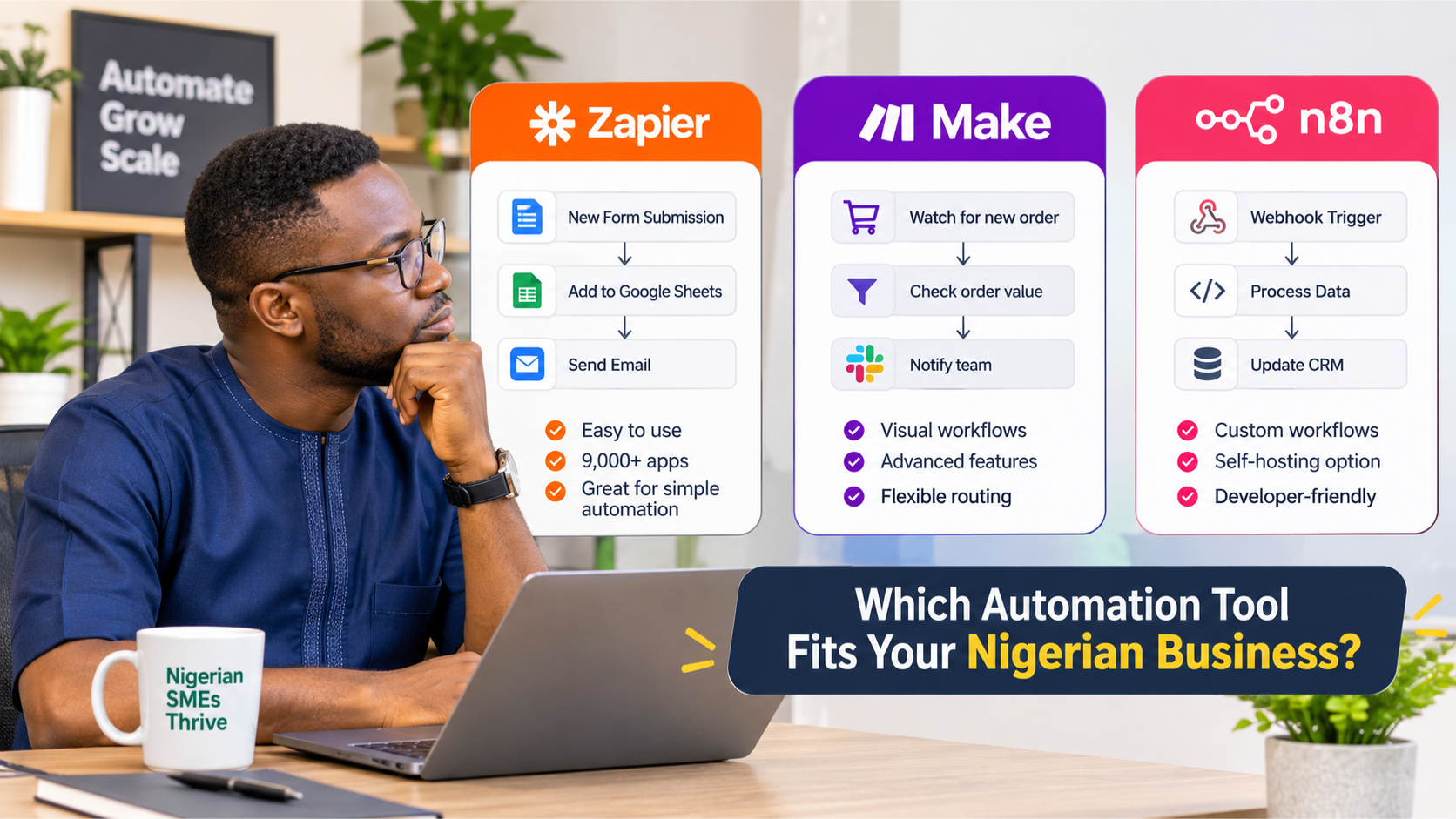
If you're considering business automation, you've probably come across three names: Zapier, Make and n8n.
They all help you connect applications and automate repetitive tasks. For example, when a customer submits an enquiry form, an automation can save their details, notify your sales team and create a follow-up task without someone manually copying information from one platform to another.
But these tools don't work in exactly the same way. They have different strengths, pricing structures, technical requirements and levels of control.
So, which one should your Nigerian business choose?
The answer depends on what you want to automate, how complex your workflows are, how much technical support you have and how much control you need over your business data.
In this guide, we'll compare Zapier, Make and n8n to help you make a practical decision.
What Are Zapier, Make and n8n?
Zapier, Make and n8n are workflow automation platforms. They connect different applications and allow information to move between them automatically.
Think about a business that receives enquiries through its website.
Without automation, someone may need to:
- Open the website's enquiry dashboard.
- Copy the customer's details.
- Add the information to a spreadsheet.
- Send a notification to the sales team.
- Create a reminder to follow up.
- Update the lead's status when someone responds.
An automation tool can connect these steps.
When a customer submits the form, the system can capture the information, save it in the appropriate location and notify the right person.
The business still decides how the process should work. The automation platform carries out the repeatable steps.
That's the basic idea behind all three tools. The difference is how they help you build, manage and run those workflows.
1. Zapier: Best for Simple Automation and Quick App Connections
Zapier is one of the most widely recognised automation platforms. It is designed to help people connect applications without having to write code.
Its workflows are called Zaps. A Zap usually starts with a trigger and follows with one or more actions.
For example:
- A customer completes a Google Form.
- Zapier captures the response.
- The customer's details are added to Google Sheets.
- A notification is sent to the sales team.
- A follow-up task is created.
Once configured, the workflow runs automatically whenever the trigger occurs.
What makes Zapier useful?
A large integration library
Zapier's official website lists more than 9,000 app integrations. This gives businesses a broad range of options when connecting popular business applications.
A relatively simple learning curve
You don't need to be a developer to create basic Zaps. Its trigger-and-action approach makes it easier for beginners to understand what happens at each stage.
Good for straightforward workflows
If your main requirement is to connect two or three applications and move information between them, Zapier can be a practical starting point.
Where does Zapier become limiting?
Zapier's simplicity is useful, but it doesn't mean every workflow will remain simple.
As your processes become more complicated, you may need conditional paths, data transformation, multiple actions and more careful control over how information moves.
You also need to monitor task usage. Zapier counts successful actions towards your task allowance, so workflows that perform many actions or run frequently can increase your subscription requirements.
Its free plan currently includes 100 tasks per month and supports two-step Zaps. Multi-step workflows and other advanced features require a paid plan.
When should your business choose Zapier?
Zapier may be a good fit if:
- You are new to workflow automation.
- Your business uses popular cloud applications.
- You need straightforward connections between tools.
- You want to build simple workflows without managing a server.
- You prefer a managed platform over technical infrastructure work.
Example: A small consulting business wants every new website enquiry added to Google Sheets and sent to the business owner's email. Zapier can handle this without requiring a complex automation setup.
2. Make: Best for Visual Workflows and More Complex Processes
Make, previously known as Integromat, offers a visual way to build automation workflows.
Instead of simply arranging a list of actions, you build a scenario using connected modules. Each module performs a task, and you can see how information moves from one step to another.
This makes Make particularly useful when a process involves several decisions or different routes.
What makes Make useful?
Visual workflow building
You can see the structure of your automation as you build it. This makes it easier to understand how information moves through a process.
Conditional routes
Not every customer or transaction needs the same treatment.
For example, an online business may want to route orders differently depending on their value or payment status.
A Make scenario could:
- Receive a new order.
- Check the order value.
- Route high-value orders to a manager.
- Send regular orders to the fulfilment team.
- Update the order record.
- Notify the customer when the order is ready.
Data transformation
Make includes tools for working with information as it moves between applications. You can format dates, manipulate text, work with arrays and organise data before sending it to another system.
This is useful when the information coming from one application doesn't match the format required by another.
Where does Make become limiting?
Make gives you more visual control, but that also means you need to understand how the different modules and routes work together.
A large scenario can become difficult to maintain if it is not organised properly.
You also need to understand its credit-based usage model. Each module action consumes credits, so a workflow with many steps or frequent executions can use more credits than expected.
Make's current free plan includes up to 1,000 credits per month. Its paid plans offer higher usage limits and additional capabilities.
When should your business choose Make?
Make may be a good fit if:
- Your workflows involve several steps.
- You need conditional decisions and multiple routes.
- You want to see how information moves through a process.
- You need to transform data between applications.
- You want more control over workflow design without managing your own server.
Example: A training company receives applications through an online form. Applicants need to be sorted by programme, eligibility and payment status. Different notifications and follow-up tasks are required for each group.
Make can help build this process visually, with separate routes for different applicant categories.
3. n8n: Best for Custom Workflows and Greater Technical Control
n8n is a workflow automation platform that supports visual workflow building, custom code and more advanced integrations.
Like Make, it uses connected nodes to represent the different steps in a workflow. However, it gives developers and technical teams additional flexibility when building more customised processes.
One of its major differences is its deployment options.
You can use n8n Cloud, which is hosted and maintained by n8n, or self-host n8n on infrastructure you manage.
What makes n8n useful?
Self-hosting options
With self-hosting, you can run n8n on infrastructure you control, such as a cloud server.
This can be important for businesses that want greater control over where their automation environment runs and how workflow data is handled.
However, self-hosting does not automatically make a system secure. You are responsible for appropriate server configuration, access controls, updates, backups and ongoing maintenance.
Custom workflow logic
n8n supports more advanced workflows, including custom code and API connections.
This makes it useful when your business needs something beyond the standard integrations offered by an automation platform.
More flexible execution model
n8n's hosted pricing is based on workflow executions rather than charging separately for every individual step in a workflow.
For example, a workflow with several nodes can count as one execution when it runs from start to finish. This can make its usage model attractive for workflows with many steps.
Integration with custom systems
If your business uses internal software, databases or applications that don't have ready-made integrations, n8n can connect to external services through APIs and custom nodes.
This is particularly useful when standard app connections are not enough.
Where does n8n become limiting?
n8n offers flexibility, but it comes with responsibilities.
If you choose self-hosting, someone needs to manage the infrastructure. That includes:
- Setting up and configuring the server.
- Securing access to the n8n environment.
- Managing credentials and permissions.
- Applying updates.
- Monitoring performance.
- Maintaining backups.
- Troubleshooting problems when workflows fail.
There is also a learning curve. While you can build workflows visually, more advanced projects may require an understanding of APIs, webhooks, data structures and JavaScript.
If you don't have the technical capacity to manage a self-hosted installation, n8n Cloud may be a better starting point.
When should your business choose n8n?
n8n may be a good fit if:
- You need custom workflow logic.
- Your processes involve APIs or internal applications.
- You want the option to self-host.
- You need greater control over your automation environment.
- You have access to someone who can build and maintain the system.
Example: A business wants to capture enquiries, check information against an internal database, apply custom qualification rules and send suitable leads into its CRM. n8n can support this type of customized workflow.
Zapier vs Make vs n8n: A Direct Comparison
The following table summarizes the practical differences.
| Feature | Zapier | Make | n8n |
|---|---|---|---|
| Main strength | Easy app connections | Visual, multi-step workflows | Custom and technical workflows |
| Learning curve | Generally easier | Moderate | Moderate to advanced |
| Workflow design | Trigger and action | Visual scenarios and routes | Visual node-based workflows |
| Conditional logic | Yes | Yes | Yes |
| Custom code | Supported | Supported | Strong customisation options |
| Integration options | 9,000+ listed apps | 3,500+ listed apps | Built-in nodes, APIs and custom nodes |
| Usage model | Tasks | Credits | Workflow executions on hosted plans |
| Cloud hosting | Yes | Yes | Yes |
| Self-hosting | No | No | Yes |
| Infrastructure management | Managed by Zapier | Managed by Make | Required if self-hosting |
The integration counts and plan structures are based on the platforms' published information and may change. Not every integration supports every action or trigger, so check the specific application you need before committing.
How Much Do Zapier, Make and n8n Cost?
Cost matters, particularly for Nigerian businesses paying for international software subscriptions.
The three platforms use different pricing models. Comparing only the starting subscription price can give you the wrong impression.
Here is what their published pricing pages currently show.
| Platform | Free option | Paid plan starting point |
|---|---|---|
| Zapier | 100 tasks/month | From $19.99/month |
| Make | Up to 1,000 credits/month | From $12/month for 10,000 credits |
| n8n Cloud | Free trial | From €20/month, billed annually |
These are published starting prices, not guaranteed quotes for every business. Plan limits, billing periods and available features differ. Check the official pricing pages before making a purchase.
What should Nigerian businesses consider when comparing prices?
1. Currency conversion
The prices above are published in US dollars or euros. Your actual Naira cost depends on the exchange rate and the payment method used.
2. Transaction and payment charges
Your bank or payment provider may apply international transaction charges or foreign currency conversion fees.
3. Workflow volume
A business running 50 automation actions each month has different needs from one running thousands of actions every day.
Estimate how often your workflows will run and how many steps each execution requires.
4. Hosting and maintenance
With n8n self-hosting, the software edition may be free, but the infrastructure is not necessarily free.
You may need to pay for server hosting, backups, monitoring and technical support. You should also account for the time required to maintain the system.
5. The cost of fixing failures
A cheap subscription is not necessarily the most affordable option if the automation frequently breaks or requires someone to correct records manually.
Look at the total cost of running the system, not just the subscription price.
Which Automation Tool Is Best for Different Nigerian Businesses?
There is no single best platform for every business. The right choice depends on the work you need to automate.
Here are some practical scenarios.
For a small business just starting with automation
Consider Zapier.
If you want to connect a form, spreadsheet, email account and a few other familiar applications, Zapier may be easier to start with.
You can automate a simple process without first building a complicated workflow.
For a business with several connected processes
Consider Make.
If your business needs conditional routing, data transformation and multiple actions, Make's visual workflow builder can make the process easier to design and understand.
For a business that needs custom integrations
Consider n8n.
If your workflows need to communicate with internal software, databases or APIs, n8n offers flexibility for more customised builds.
For a business with specific data-control requirements
Consider self-hosted n8n.
If your organisation wants to run its automation environment on infrastructure it controls, self-hosted n8n may be worth considering.
However, this option requires proper technical management. You should assess your security requirements, infrastructure capacity and maintenance responsibilities before choosing it.
For a business without an in-house technical team
Consider Zapier or Make first, or use a managed implementation service.
The most advanced tool is not always the best choice.
If nobody in your business can maintain a complex automation, you may end up replacing one manual problem with a technical problem.
Choose a platform your team can operate, or work with a provider who can build, document and support the system.
A Practical Example: Automating a Business Lead Management Process
Let's consider a Nigerian consulting company that receives enquiries through its website.
Currently, someone checks the form submissions, copies the details into a spreadsheet, reviews each enquiry and sends the information to the appropriate person.
The business wants to automate this process.
The workflow might look like this:
- A prospective customer submits an enquiry form.
- The system captures the customer's name, email, company and service interest.
- The information is checked and organized.
- The lead is assigned a category based on the business rules.
- The lead is added to the company's CRM or lead tracker.
- The appropriate team member receives a notification.
- A follow-up task is created.
This workflow can be built using any of the three platforms, provided the required applications and actions are supported.
The difference is in how you build it.
- Zapier: A straightforward trigger-and-action setup may be enough if the process is simple.
- Make: A visual scenario can handle different lead categories and route each one to the right person.
- n8n: A customized workflow can connect to internal systems, apply more complex rules and use APIs where needed.
The business process should determine the tool, not the other way around.
Common Mistakes to Avoid When Choosing an Automation Tool
Before subscribing to any platform, avoid these mistakes.
1. Choosing based on popularity
A platform may be popular, but that doesn't mean it is the right fit for your business.
Look at the actual process you want to automate and the applications involved.
2. Comparing subscription prices without calculating usage
A low starting price can become expensive when your workflows run frequently.
Estimate the number of tasks, credits or executions you expect to use.
3. Automating a process that is already broken
Automation does not automatically fix a poor business process.
If your team has no clear method for handling customer enquiries, automating the existing confusion may only make it happen faster.
Understand the process first. Then decide what should be automated.
4. Ignoring maintenance
Every automation needs some level of monitoring.
Applications change. Credentials expire. APIs can fail. Workflows may stop working when an application changes how it handles information.
Make sure someone is responsible for checking that your systems continue to work.
5. Assuming self-hosting means automatic security
Running n8n on your own server gives you more control over the environment. It also gives you responsibility for securing and maintaining it.
You need proper access controls, updates, backups and server configuration.
6. Building everything before testing
Don't connect every department and business process at once.
Start with one clearly defined workflow. Test it with real examples, check what happens when something fails and get approval before expanding it.
Do You Need Zapier, Make or n8n — or Do You Need a Custom System?
This is an important question.
Automation platforms are useful when your business already uses applications that can be connected.
But sometimes the problem is not simply that your applications don't communicate.
You may have no proper place to manage leads, track projects, monitor internal operations or organize information.
In that situation, connecting more applications may not solve the underlying problem.
You may need a custom internal tool instead.
For example, a business may need a dashboard that brings together its leads, projects, invoices, delivery milestones and team activities. A combination of integrations and custom software may be more suitable than trying to force everything into one off-the-shelf platform.
At Marex Ventures, we look at the business process before recommending a tool.
Our approach starts with understanding how your business currently operates, identifying repetitive work and disconnected systems, and deciding whether automation, custom software or a combination of both is the right answer.
The goal is not to give you more tools to manage. It is to build a system that helps your business run better.
How Marex Ventures Helps Businesses Choose and Implement Automation
Choosing between Zapier, Make and n8n is only one part of an automation project.
The more important work is understanding what needs to happen, which applications are involved and how the automated process should operate.
Our process follows five stages:
- Workflow audit: We review your existing operations, tools and repetitive processes.
- Build or configuration: We select the appropriate platform and build the required connections and workflow logic.
- Testing: We test the system to confirm that information moves correctly and expected actions happen.
- Deployment: We put the approved automation into use.
- Handover and training: We show your team how to use the system and provide relevant documentation.
We work with Zapier, Make and n8n, depending on what the project requires. For businesses that need more control over their automation environment, we can also work with self-hosted n8n deployments.
You don't need to choose a platform before speaking with us.
Start with the business problem. We'll help you determine the right approach.
Ready to identify what your business should automate? Explore our Workflow & Systems Audit or learn more about our Automation Systems service.
Frequently Asked Questions
Is Zapier better than Make?
Not necessarily. Zapier is often easier for straightforward app connections, while Make offers a visual workflow builder that is useful for more complex scenarios involving routes and data transformation. The better option depends on your workflow.
Is n8n better than Zapier?
n8n offers more flexibility for custom workflows and supports self-hosting. Zapier is generally easier for beginners who want to connect popular applications without managing infrastructure. Neither is automatically better for every business.
Is n8n free to use?
n8n offers a self-hosted Community Edition that can be used without a standard subscription fee. However, you may still have to pay for server hosting, maintenance, backups and technical support. n8n also offers paid cloud plans. Check its official pricing page for current details.
Can I use Zapier, Make or n8n in Nigeria?
Yes. Nigerian businesses can use these platforms to connect supported applications and automate business processes. Before subscribing, check the payment methods available to you, currency conversion charges, supported integrations and any service-specific restrictions.
Which automation tool is easiest for beginners?
Zapier is often the easiest starting point for simple workflows because of its trigger-and-action approach. Make is also accessible, although its visual scenarios can take more time to understand. n8n has a steeper learning curve for advanced workflows.
Can I switch from Zapier to Make or n8n later?
Yes, but switching may require rebuilding your workflows. The platforms use different structures and logic, so you should document your existing automations, integrations, credentials and business rules before migrating.
Can one business use Zapier, Make and n8n together?
Yes. A business can use more than one automation platform if there is a clear reason. However, using several tools without a proper plan can make systems harder to manage. Start with the business requirements and avoid unnecessary duplication.
Does my business need an automation expert?
Not every simple automation requires an expert. You can build basic workflows yourself. However, if the process involves several applications, sensitive business information, complex logic or critical operations, professional implementation can help reduce errors and make the system easier to maintain.
Final Thoughts: Choose the Tool That Fits the Work
Zapier, Make and n8n can all help Nigerian businesses reduce repetitive work and connect disconnected applications.
The right choice depends on your requirements:
- Choose Zapier when you want simple, quick connections between popular applications.
- Choose Make when you need visual control over multi-step workflows and conditional routes.
- Choose n8n when you need more customization, technical flexibility or the option to self-host.
But remember: the platform is only a tool.
A well-designed workflow matters more than choosing the most popular automation software. Before you subscribe, understand the process you want to improve, the applications involved and what should happen when the automation runs.
Build the system your business needs, not the one a software subscription makes convenient.